Digital visual timers make passing time easier to understand at a glance, whether you are managing classroom activities, children’s routines, focused work, workouts, or cooking.
We compared 10 popular options across display size, countdown features, controls, portability, alerts, and everyday usability to help you choose the right timer for your space.
Best 10 Digital Visual Timers Picks for 2026
Best All-Around Pick

- Twist-to-set operation with countdown and count-up modes
- Large digits with three brightness settings
- Magnetic back and adjustable alarm volume
Best For: Kitchens, classrooms, families, and simple daily routines
Best Quiet Classroom Timer

- Clock, countdown, count-up, and alarm functions
- Silent timing with an end-of-cycle alert
- Orange ring shows progress at a glance
Best For: Classrooms, offices, studying, and quiet routines
Best Large-Display Pick
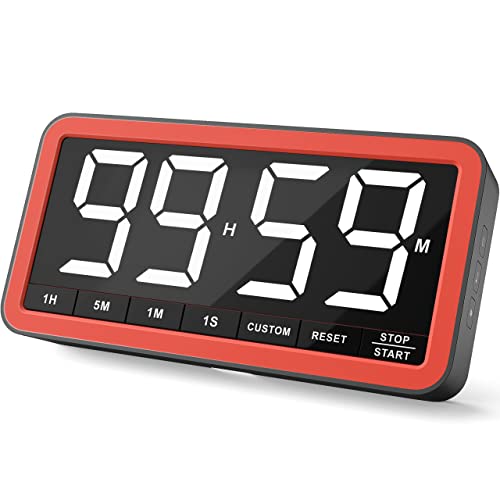
- Extra-large display with 2.3-inch numbers
- Countdown and count-up timing up to 99:59:59
- USB-C charging and four alert options
Best For: Classrooms, kitchens, meetings, workouts, and room-wide visibility
Best Pomodoro Timer
Rotating Visual Bar Timer Cube

- Flip-to-start presets from 3 to 50 minutes
- Colorful bar shows progress visually
- Sound, silent, and vibration alert modes
Best For: Pomodoro sessions, homework, habits, and portable focus routines
Best Value 2-Pack
Antonki Digital Timer for Kids
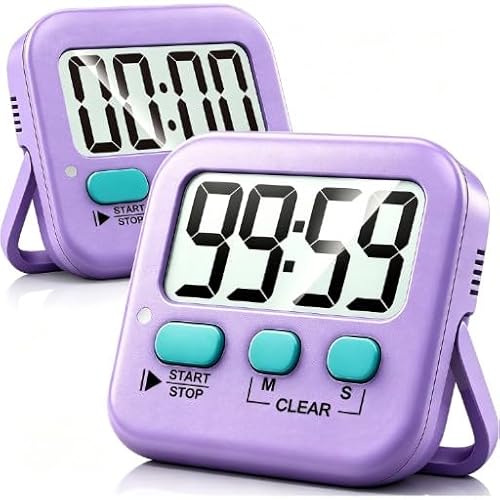
- Two timers with AAA batteries included
- Count-up/countdown timing to 99:59
- Loud alarm and silent flashing-light modes
Best For: Families and classrooms needing two compact timers
Best Visual Display
Yunbaoit Rechargeable Visual Timer
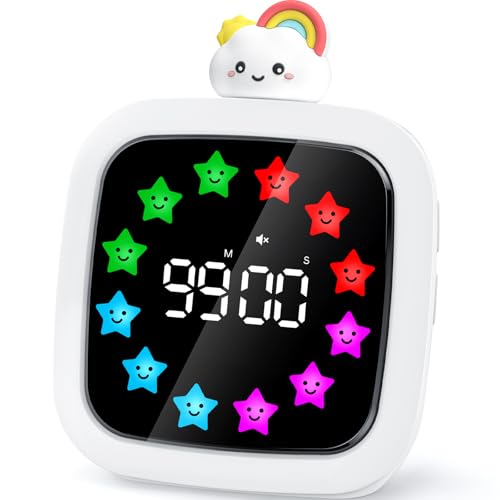
- Color blocks visibly show time passing
- Rechargeable battery lasts at least 25 hours
- Custom colors, 19 alarms, and four volumes
Best For: Visual study, classroom, and routine timing
Best Simple Classroom Set

- Blue and green timers with large displays
- Count-up/countdown timing to 99:59
- Magnetic back, stand, and hanging hook
Best For: Teachers and families needing two easy timers
Best Rechargeable Pick

- Rechargeable battery lasts up to 14 days
- Countdown, count-up, clock, and alarm modes
- Adjustable brightness with three volume levels
Best For: Families, classrooms, and therapy routines
Best Compact Option

- Compact design with visual progress bars
- Counts up, counts down, and pauses
- Backlit display with three volume settings
Best For: Homework, homeschool, and classroom activities
Best Silent Study Pick

- Colorful segments show time remaining
- Silent flashing mode plus low or high volume
- Pause button stops and resumes the countdown
Best For: Quiet study, exams, chores, and one-hour tasks
Best All-Around Pick – AVINIA Rotary Visual Timer
The AVINIA is a practical choice if you want digital visual timers that are easy for children, seniors, and everyday household users to operate. Its twist-adjust dial, large LED digits, countdown/count-up modes, and magnetic back make it suitable for cooking, classrooms, workouts, and study sessions.
Best For: Kitchens, classrooms, families, and users who want simple magnetic placement.
Pros:
- Rotary ring makes setting up to 99 minutes quick and straightforward.
- Large LED display offers three brightness modes, including a light-off option.
- Magnetic back supports convenient placement on refrigerators, ovens, and whiteboards.
- Offers silent operation plus three alarm-volume levels, reaching up to 90 dB.
Cons:
- Runs on three AAA batteries rather than a rechargeable battery.
- Its 99-minute timing range is shorter than extended-duration models.
This is a versatile digital visual timer for general-purpose use, especially when a magnetic mount and highly visible display matter more than long-duration timing.
Best Quiet Classroom Timer – EooCoo 3-in-1 Visual Timer
The EooCoo is a compact option among digital visual timers, combining a clock, countdown/count-up timer, and alarm in one desktop design. Its silent countdown and orange visual ring can help classrooms, offices, and study spaces stay focused without a constant ticking sound.
Best For: Classrooms, study areas, offices, and quiet learning environments.
Pros:
- Combines a clock, timer, and alarm with 12- and 24-hour display modes.
- Orange ring decreases visibly during the countdown for easy progress tracking.
- Silent during timing, with a prompt sound only when the timer ends.
- Simple knob operation adjusts time in one-minute increments up to 60 minutes.
Cons:
- Maximum countdown duration is limited to 60 minutes.
- Uses two AAA batteries instead of USB-C charging.
- Designed for desktop viewing rather than magnetic or wall placement.
Choose the EooCoo when quiet operation and a small classroom-friendly footprint are priorities. It is less suitable for long cooking sessions or activities requiring more than an hour.
Best Large-Display Pick – VOCOO 7.8-Inch Digital Timer
The VOCOO stands out among digital visual timers for its extra-large 7.8-inch display and long timing range. It can count down from 99:59:59 or count up as a stopwatch, while multiple alert modes, brightness levels, and placement options make it adaptable for classrooms, kitchens, workouts, and shared spaces.
Best For: Classrooms, kitchens, meetings, workouts, and anyone who needs a timer visible across a room.
Pros:
- Large 2.3-inch-tall numbers are designed for easy viewing from a distance.
- Supports countdown and count-up timing for up to 99 hours, 59 minutes, and 59 seconds.
- Includes silent flashing, three audible alarms, and three volume levels.
- USB-C rechargeable design offers over seven days of use on low brightness, according to the supplied notes.
Cons:
- Its larger size may take more desk or wall space than compact timers.
- It is heavier than the smaller desktop models.
This is the strongest fit for group settings and extended timing. The large display and flexible alerts are useful when several people need to see or hear the remaining time.
Best Pomodoro Timer – Rotating Visual Bar Timer Cube
This rotating timer cube takes a different approach to digital visual timers: flip a side face-up to start preset intervals of 3, 5, 10, 25, 30, or 50 minutes. Its colorful progress bar, silent or vibration alerts, and compact design make it particularly useful for Pomodoro sessions, homework, habits, and daily transitions.
Best For: Pomodoro work cycles, homework, ADHD-friendly routines, habit building, and portable use.
Pros:
- Flip-to-start operation avoids phone apps and complicated setup.
- Preset sides include common focus and break intervals, with custom timing available.
- Colorful progress bar provides a visual sense of time passing.
- Offers sound, silent, or vibration alerts with adjustable volume.
Cons:
- Preset-side operation may be less flexible than a conventional rotary dial for some users.
- Battery life is listed as 20-plus hours of continuous use, which may require more frequent charging than larger models.
- The compact display may be less visible from across a room.
For focused work and routine-building, this cube is more engaging than a standard countdown timer. Its flip controls and visual progress bar are especially well suited to short, repeatable intervals.
Best Value 2-Pack – Antonki Digital Timer for Kids
For shoppers comparing digital visual timers for classrooms, homework, or kitchen tasks, the Antonki 2-pack offers straightforward count-up and countdown timing in a compact format. It includes two AAA batteries and supports settings up to 99 minutes, 59 seconds.
Best For: Families, teachers, and households that need two simple timers for simultaneous tasks or multiple rooms.
Pros:
- Includes two timers and two pre-installed AAA batteries.
- Supports count-up and countdown timing with memory for the last setting.
- Offers loud alarm and silent flashing-light modes.
- Magnetic back, kickstand, and hanging hole provide flexible placement.
Cons:
- Cannot set hours and does not include a clock function.
- Batteries are not rechargeable, and the timer has no automatic shutoff.
- The alarm beeps while settings are being entered, even when using the alarm mode.
Its two-timer value and flexible mounting make it a practical pick for everyday time management, especially where a silent classroom mode and a louder kitchen alert are both useful.
Best Visual Display – Yunbaoit Rechargeable Visual Timer
The Yunbaoit is a colorful choice among digital visual timers, combining a numeric countdown with shrinking color blocks that show time passing at a glance. Its rotating doll-head control, rechargeable battery, and customizable displays make it especially engaging for children.
Best For: Kids and adults who want a highly visual timer for study sessions, classroom routines, Pomodoro-style work, or cooking.
Pros:
- Visual color blocks make the remaining time easy to see.
- Rechargeable battery provides at least 25 hours of operation.
- Pause-and-resume function and automatic memory simplify repeated use.
- Includes nine color displays, DIY color editing, 19 music alarms, and four volume options.
Cons:
- Time can be adjusted only in minutes, not seconds.
- It is a single timer rather than a multipack.
This model is the strongest fit when visual feedback and customization matter more than precise second-by-second settings. The rechargeable design also avoids routine battery replacement.
Best Simple Classroom Set – AOUCE Digital Timer 2-Pack
The AOUCE 2-pack is a basic, easy-to-read option for digital visual timers in classrooms and activity spaces. The blue and green units have large displays, three-button controls, and countdown or count-up timing up to 99 minutes, 59 seconds.
Best For: Teachers, children, and families who need two simple timers for homework, games, exercise, reading, or classroom activities.
Pros:
- Includes one blue and one green timer with large displays.
- Supports count-up and countdown timing to 99:59.
- Memory setting recalls the last countdown time.
- Magnetic back, retractable stand, and hanging hook allow varied placement.
Cons:
- Batteries are not included.
- It has fewer controls and features than more customizable visual timers.
- The supplied details describe a single setting and do not list a silent mode.
With two colors and uncomplicated controls, this set is well suited to shared spaces where readability and flexible placement are more important than advanced alarms or rechargeable power.
Best Rechargeable Pick – Independent Routine Timer
This digital visual timer is designed for calmer transitions at home, in classrooms, or in therapy settings. Its colorful countdown dots, smiley face, adjustable brightness, and simple twist-and-press controls make remaining time easier for children to understand and manage.
Best For: Families and educators who want a rechargeable timer that supports routines, independence, and sensory-friendly settings.
Pros:
- Rechargeable battery lasts up to 14 days per charge.
- Supports countdown, count-up, clock, and alarm modes from 5 seconds to 99 minutes.
- Offers silent, medium, and loud volume levels plus adjustable brightness.
- Simple controls are intended for children ages 3 and up.
Cons:
- Its plastic construction may show wear with heavy daily handling.
- It is larger and heavier than the compact blue timer in this roundup.
Choose this model if dependable charging and flexible sensory settings matter more than having the smallest possible timer. The memory function and broad routine applications also make it a practical shared tool for busy households.
Best Compact Option – Blue Smiley Countdown Timer
This compact digital visual timer uses a smiley face and visual progress bars to make time management more approachable for children. The knob-operated design supports countdown, count-up, pause, and timing periods of up to 99 minutes without the ticking sound of a mechanical timer.
Best For: Kids, homeschoolers, and study spaces that need a small, easy-to-read timer with flexible sound settings.
Pros:
- Visual progress bars and a child-friendly smiley face make time easier to follow.
- Counts up or down and includes a pause function.
- Backlit display is designed for visibility day or night.
- High, low, and mute volume settings suit different environments.
Cons:
- Its listed timing range tops out at 99 minutes, with no longer-duration mode noted.
- The supplied details do not mention rechargeable power, so battery convenience is less clear.
This is a straightforward choice when portability and approachable controls are priorities. It offers the core features needed for homework, playtime, and classroom activities without adding complicated settings.
Best Silent Study Pick – Rainbow 60-Minute Timer
This digital visual timer uses colorful rainbow segments to show how much time remains during focused tasks. It offers a 60-minute countdown, a pause button, and silent, low-volume, or high-volume alerts, making it suitable for study, chores, meetings, cooking, and classroom transitions.
Best For: Users who want a portable, distraction-free timer for tasks lasting up to one hour.
Pros:
- Rainbow segments provide an intuitive view of time remaining.
- Silent mode can flash the light instead of sounding an alert.
- Pause and restart controls stop the screen, sound, and lights together.
- Small design fits on desks and counters.
Cons:
- It has a 60-minute maximum rather than a 99-minute range.
- Two AAA batteries are required and are not included.
- Operating instructions are provided on the package, so the packaging should be retained.
This model is a good fit for short, structured work periods where a visual cue is more useful than a phone notification. Its silent flashing mode is especially practical for reading, exams, and quiet study.
How We Picked the Best Digital Visual Timers
We focused on features that make a visual timer genuinely useful: an easy-to-read display, a clear countdown indicator, simple controls, dependable alerts, and practical placement options. The roundup includes compact timers for children and study sessions, larger magnetic models for kitchens and classrooms, rechargeable options, and multipacks for shared spaces.
Because needs vary, we also considered countdown range, count-up or stopwatch functionality, silent modes, pause controls, preset intervals, and whether a timer is easy to carry or mount. Product descriptions and listed specifications were weighed alongside the intended use, rather than treating one design as ideal for every buyer.
Quick Comparison
| Best For | Features to Prioritize |
|---|---|
| Classrooms and group activities | Large display, strong alert, magnetic or tabletop placement |
| Children and transitions | Simple controls, colorful visual bar, quiet or adjustable alerts |
| Study and productivity | Preset intervals, pause function, Pomodoro support |
| Cooking and baking | High visibility, magnetic mounting, reliable countdown |
| Shared rooms or multiple users | Two-packs, durable controls, flexible placement |
Key Buying Factors for Digital Visual Timers
Display Size and Visibility
A large LED screen is easier to read from across a room, which matters in classrooms, kitchens, and therapy or activity spaces. Smaller displays may be preferable for desks, bedside use, or travel.
Countdown Range and Timer Modes
Check the maximum countdown length and whether the timer also supports count-up or stopwatch operation. A 60- or 99-minute range handles most routines, while preset intervals can speed up repeated study or activity sessions.
Alerts, Silence, and Pause Controls
Audible alarms are useful when you may not be watching the display, but quiet operation can be essential for children, classrooms, offices, and shared spaces. A pause button is valuable when interruptions are unavoidable.
Power and Placement
Battery-powered timers are convenient and portable. Rechargeable models reduce battery changes, while magnets, stands, and compact shapes determine where the timer can be used comfortably.
Who Should Buy Which Digital Visual Timers?
Choose a large magnetic timer if visibility across a kitchen or classroom is your priority. For children who benefit from concrete transition cues, look for a colorful visual indicator, straightforward buttons, and a quiet mode. Students and remote workers may prefer a Pomodoro-style timer with preset intervals and pause functionality.
If several children, teachers, or household members need timers at once, a two-pack offers better coverage and may be more practical than moving one device between rooms. For flexible everyday use, choose a rechargeable model with a broad countdown range and an easy-to-read display.
The best choice ultimately depends on where the timer will sit, how far away it must be visible, and whether the user needs simple visual guidance or more advanced timing modes.