The best communication buttons for classrooms give students a simple, repeatable way to express needs, answer questions, participate in routines, or practice speech. This roundup includes dedicated AAC devices alongside recordable buttons, buzzers, and visual communication aids.
Because classroom needs vary widely, we focused on recording flexibility, ease of use, portability, durability, and how well each option supports structured communication activities.
Best 10 Communication Buttons for Classrooms Picks for 2026
Most Versatile AAC Tablet
Joyreal AAC Communication Device

- 37 pre-installed picture-based talking buttons
- Eight programmable voice-recording buttons
- Adjustable volume and male/female voices
Best For: Learners needing broad, customizable communication support
Best for Daily Encouragement
Learning Resources Message Maker

- 20-second rerecordable audio message
- No batteries required
- Designed for social-emotional learning
Best For: Affirmations, reminders, and classroom motivation
Best Multi-Student Value
Portable AAC Recording Buttons
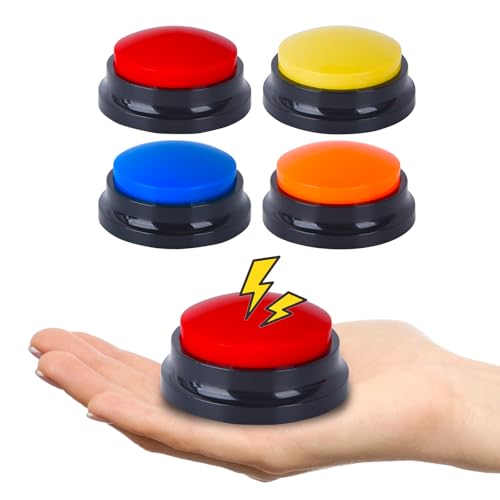
- Four portable customizable buttons
- Up to 30 seconds per recording
- Clear built-in speaker output
Best For: Multiple students, stations, and therapy activities
Best for Classroom Games
Learning Resources Answer Buzzers

- Four brightly colored independent buzzers
- Seven-second customizable recordings
- Large buttons for accessible pressing
Best For: Quizzes, learning centers, and group participation
Routine-Based Communication Support
Visual Schedule Speech Buttons

- Four visual routine charts plus six colored buttons
- Numbered self-care steps support daily instruction
- Adhesive dots make setup straightforward
Best For: Teaching self-care routines with visual and audio prompts
Fast-Paced Participation Pick

- Six differently colored classroom buzzers
- Records messages or sounds up to 30 seconds
- Useful for games, choices, and group responses
Best For: Interactive lessons and small-group response activities
Large-Group Classroom Set
Eight Voice Recordable Buttons
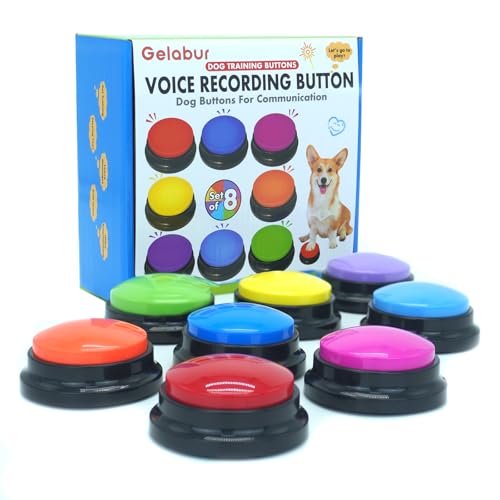
- Eight assorted-color buttons for group use
- Records up to 30 seconds per button
- Durable design supports repeated handling
Best For: Larger classes needing customizable participation buttons
Colorful 4-Pack

- Four colors for organizing prompts or players
- Records up to 30 seconds of audio
- Portable tabletop design
Best For: Small-group activities and color-coded communication practice
Classroom Starter Set
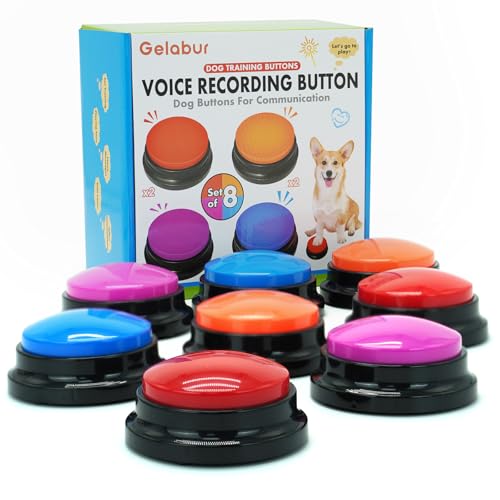
- Eight buttons for group participation
- Up to 30 seconds per recording
- Designed for repeated use
Best For: Larger classes and multi-station interactive lessons
Artist Unknown 4-Pack

- Four-color set for short recorded prompts
- Records up to 30 seconds
- Portable for tabletop activities
Best For: Small-group study, classroom, and interactive word activities
Most Versatile AAC Tablet – Joyreal AAC Communication Device
For classrooms needing communication buttons for classrooms with more built-in guidance, the Joyreal AAC device combines picture-based prompts, spoken output, and customizable recordings. Its 37 pre-installed messages, adjustable volume, and portable storage bag make it suitable for everyday communication support.
Best For: Nonverbal children, students with autism or special needs, and speech-therapy or rehabilitation settings.
Pros:
- Includes 37 picture-and-color talking buttons for common needs and instructions.
- Eight programmable buttons allow personalized voice recordings.
- Offers male or female voice selection and adjustable volume.
- Lightweight design includes a storage bag for portability.
Cons:
- Requires three AAA batteries.
- More elaborate than a simple single-message classroom button.
This is the most feature-rich option in the group for learners who need a broader vocabulary than one customizable button can provide. The pictorial cues and programmable spaces also support personalized classroom routines.
Best for Daily Encouragement – Learning Resources Message Maker
The Learning Resources Message Maker is a simple choice for communication buttons for classrooms when the goal is sharing encouragement, reminders, jokes, or affirmations. Its 20-second recording time can be refreshed repeatedly without batteries.
Best For: Social-emotional learning activities, classroom encouragement, daily messages, and wall-mounted reminders.
Pros:
- Records messages of up to 20 seconds and can be rerecorded repeatedly.
- Requires no batteries and uses manual operation.
- Durable plastic construction is suitable for classroom or portable use.
- Designed for children ages 4 to 16 and social-emotional learning.
Cons:
- Provides one customizable message rather than multiple communication choices.
- Its emphasis is on affirmations and reminders rather than broad AAC support.
Choose this button when teachers want a low-maintenance, easy-to-update audio prompt. It works especially well as a motivational station or personal message tool rather than as a complete communication system.
Best Multi-Student Value – Portable AAC Recording Buttons
This four-pack gives classrooms multiple communication buttons for classrooms, allowing several students, stations, or activities to have their own personalized audio prompt. Each compact button records up to 30 seconds and produces clear voice output through its built-in speaker.
Best For: Schools, homes, therapy courses, and classrooms that need several portable recording buttons.
Pros:
- Includes four independently customizable recording buttons.
- Each button stores up to 30 seconds of recorded sound.
- Compact, lightweight design is easy to move between activities.
- Built-in speakers provide audible voice output.
Cons:
- Requires two AAA batteries per button, which are not included.
- Messages must be created by the user rather than selected from pre-installed options.
The four-button format is practical when a teacher wants separate prompts for different learners or learning centers. It offers more recording time than the single-message alternatives, though it requires battery management across the set.
Best for Classroom Games – Learning Resources Answer Buzzers
For interactive communication buttons for classrooms, the Learning Resources Recordable Answer Buzzers turn participation into a group activity. The set includes four brightly colored buzzers, each with a customizable seven-second recording for quizzes, learning centers, or classroom games.
Best For: Group participation, quizzes, learning centers, trivia, and simple recorded responses.
Pros:
- Four distinct buzzers support group activities and independent use.
- Each buzzer offers up to seven seconds of customizable recording.
- Large buttons are designed for accessible pressing.
- Bright colors and durable construction suit energetic classroom use.
Cons:
- Seven seconds provides less recording time than the other recordable options.
- Requires two AAA batteries.
- Best suited to short responses and game prompts rather than extended communication.
This set is a strong fit when the priority is participation and classroom interaction. Its four independent buzzers make it easy to assign sounds or messages to students, teams, or activity stations.
Routine-Based Communication Support – Visual Schedule Speech Buttons
For classrooms supporting children with communication difficulties, the WATINC Autism Life Routine Chart combines visual prompts with six recordable speech buttons. The numbered self-care steps and customizable audio cues can make routines more interactive and easier to follow.
Best For: Classrooms, care facilities, and homes teaching daily living routines to nonverbal children.
Pros:
- Includes four routine charts and six colored speech buttons.
- Charts cover practical routines such as bathroom use, brushing teeth, dressing, and handwashing.
- Buttons provide clear, loud recorded audio and can be positioned beside chart icons.
- Adhesive dots support wall, mirror, or door installation.
Cons:
- Requires two AAA batteries per button, which are not included.
- The chart topics focus primarily on self-care routines rather than general classroom communication.
This is a focused choice when communication buttons for classrooms need to reinforce predictable personal-care sequences. Its visual structure and recorded prompts are especially useful for routine-based instruction.
Fast-Paced Participation Pick – Recordable Answer Buzzers
The six-piece recordable buzzer set offers a simple way to add student responses, review games, and group participation to classroom activities. Each colored button records up to 30 seconds, so teachers can assign different sounds, answers, or messages to individual buzzers.
Best For: Interactive classroom games, response practice, homeschooling, and small-group activities.
Pros:
- Six buzzers come in different colors for assigning options or groups.
- Records up to 30 seconds of speech, songs, messages, or other sounds.
- ABS construction is designed for repeated use and includes clear, loud playback.
- Recording and playback use a straightforward press-and-hold process.
Cons:
- Requires two AAA batteries, which are not included.
- The product is presented as a game-show buzzer and does not include classroom visual supports.
Among communication buttons for classrooms, this set is best suited to energetic, response-driven lessons rather than routine communication. The six colors and customizable recordings give teachers flexibility for quizzes, choices, and participation cues.
Large-Group Classroom Set – Eight Voice Recordable Buttons
The Gelabur eight-button set gives classrooms more customizable communication points than smaller packs. Students can record up to 30 seconds of audio, making the buttons adaptable for participation activities, demonstrations, and playback-based learning.
Best For: Classrooms needing multiple recordable buttons for student engagement and group activities.
Pros:
- Includes eight buttons in assorted colors for different students, teams, or responses.
- Each button supports recordings of up to 30 seconds.
- Designed for repeated use by children and pets with a durable construction.
- Can support both classroom activities and customizable command or communication practice.
Cons:
- Requires two AAA batteries, which are not included.
- Its product positioning is primarily pet-focused, so classroom use may require teacher-created activities.
- No visual schedule cards or other instructional materials are included.
This set is a practical option when communication buttons for classrooms need to be distributed across a larger group. Its eight-button count and customizable recordings offer flexibility, but teachers will need to supply the lesson structure and labels.
Colorful 4-Pack – Compact Recording Buttons
If you need versatile communication buttons for classrooms, this four-pack offers a simple way to add recorded prompts, responses, or sound effects to activities. Each button records up to 30 seconds and plays the sound back when pressed.
Best For: Teachers, families, or activity leaders who want four individually colored buttons for interactive language and group games.
Pros:
- Records and replays up to 30 seconds of sound.
- Four colors can help distinguish different prompts or users.
- Compact tabletop design is easy to carry for indoor activities or outings.
- Manual recording process is straightforward: press REC, record, release, and press to play.
Cons:
- Batteries are not included.
- The manufacturer recommends the product for ages 12 and up.
This is a practical starter option when color coding and portability matter. Its recording capacity supports short classroom cues, though the age recommendation and battery requirement should be considered before purchase.
Classroom Starter Set – Eight Recordable Buttons
For classrooms that need several communication buttons for classrooms activities, this eight-button set provides more units for group participation. Every button supports recordings of up to 30 seconds and is designed for repeated use by children or pets.
Best For: Larger classroom groups, interactive lessons, and users who want multiple customizable buttons available at once.
Pros:
- Includes eight buttons for broader group participation.
- Each button records up to 30 seconds of customizable audio.
- Can support student voice recording and playback during activities.
- Described as durable and made from pet-safe materials for repeated use.
Cons:
- Requires two AAA batteries.
- The buttons are also marketed for dog training, so classroom-specific features are limited.
- The larger set weighs about 1.08 pounds, which may be less convenient to transport than a smaller pack.
With twice as many units as a four-pack, this set is the stronger choice for shared classroom stations or simultaneous participation. Confirm that the battery supply and general-purpose design fit your lesson setup.
Artist Unknown 4-Pack – Clear Voice Playback Buttons
This four-color set gives buyers a compact option for communication buttons for classrooms, study spaces, or interactive games. The buttons record up to 30 seconds of clear audio and replay it with a press, making them useful for short verbal prompts and responses.
Best For: Small groups, study activities, and users who want four portable buttons for recorded words, sentences, or sound effects.
Pros:
- Provides up to 30 seconds of clear recording per button.
- Four colors offer simple visual separation between buttons.
- Small, portable design works for tabletop activities and outings.
- Supports recorded words, sentences, and sound effects.
Cons:
- Batteries are not included.
- Not recommended for children under 12.
- Recording requires following a press-and-release sequence with beeps.
This model is a straightforward four-button choice for short audio-based activities. It is most appropriate where users can manage the stated recording procedure and age guidance.
How We Picked the Best Communication Buttons for Classrooms
We selected products that can support classroom communication, participation, speech practice, or visual routines. The list includes purpose-built AAC equipment, single-message recording buttons, multi-button sets, answer buzzers, and visual-schedule tools. We considered whether each product appears suitable for repeated classroom use, how easily adults can record or reset messages, and whether the format works for individual or group activities.
Not every button is a substitute for a full AAC system. Recordable buttons are often best for limited, predictable messages, while an AAC tablet or visual schedule may support broader communication goals.
Quick Comparison
| Type | Best for | Main advantage | Watch for |
|---|---|---|---|
| AAC communication device | Individual expressive communication | More flexible than a single button | Setup, charging, and learning curve |
| Single recordable button | Requests, routines, and prompts | Simple and fast to use | Usually supports one message at a time |
| Multi-button set | Choice-making and classroom games | Several messages or responses | Requires clear labeling and organization |
| Answer buzzer | Quizzes and group participation | Immediate visual or audible feedback | May be less suitable for AAC needs |
| Visual schedule with buttons | Transitions and daily routines | Combines visual and spoken cues | Best for structured activities |
Key Buying Factors for Communication Buttons for Classrooms
Recording and Playback
Check the recording length, volume, playback clarity, and whether messages can be replaced easily. Short recordings work for “help,” “break,” or “my turn,” while longer recordings may support scripted responses or routine directions.
Access and Activation
A large, low-force button can be easier for students with motor difficulties. Consider the button’s size, resistance, surface texture, and whether accidental presses are likely. For group activities, bright colors and distinct shapes can help students identify their assigned response.
Durability and Maintenance
Look for sturdy construction and simple battery access. Confirm whether the device uses replaceable batteries, how frequently they may need changing, and whether the surface can be cleaned safely. Avoid assuming that a product is spillproof or classroom-proof unless the listing explicitly says so.
Communication Goals
Match the tool to the student’s goal. A single-message button may reinforce a routine, whereas a dedicated AAC device can provide more independent choices. Teachers and speech-language professionals should consider vocabulary, symbol support, prompting, and compatibility with the student’s existing communication plan.
Who Should Buy Which Communication Buttons for Classrooms?
Choose a dedicated AAC communication device when a student needs multiple phrases, broader vocabulary, or a portable tool for individual communication. Choose a single recordable button for predictable messages, classroom jobs, transitions, or repeated requests. Multi-button sets are useful for choice boards, centers, turn-taking, and small-group practice. Answer buzzers fit best in quizzes, review games, and participation activities where speed and feedback matter. A visual schedule with speech buttons is a strong option when the priority is making routines and transitions easier to understand.
Before buying, confirm the product’s recording process, power requirements, dimensions, and intended use. For students with complex communication needs, use these products as classroom supports rather than automatically replacing an established AAC assessment or communication system.