The best communication buttons for home use make it easier to request help, express needs, practice speech, or create simple routines without relying on complex technology.
This roundup compares AAC devices, caregiver call buttons, and recordable buzzers so you can choose a setup that fits the user, room, and communication goal.
Best 10 Communication Buttons for Home Use Picks for 2026
Portable Voice Choice
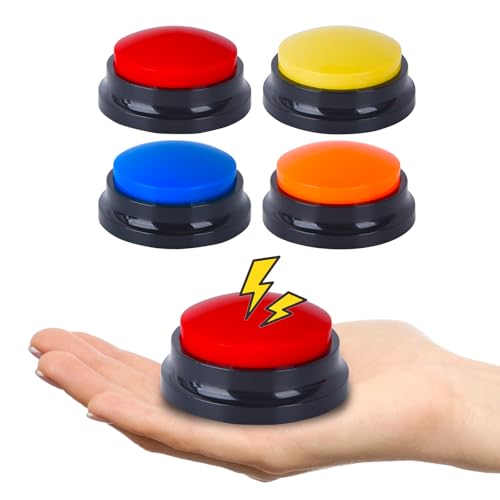
- Records personalized messages up to 30 seconds
- Built-in speakers provide clear voice output
- Portable four-button set for home, school, or therapy
Best For: Custom voice prompts for nonverbal communication support
Interactive Learning Pick

- Four brightly colored independent buzzers
- Records short seven-second messages
- Large buttons support accessible participation
Best For: Home learning, games, quizzes, and short communication prompts
Feature-Rich AAC Pick

- 37 pre-installed picture-based prompts
- Eight programmable recording buttons
- Adjustable volume and male/female voices
Best For: Daily communication support with built-in and custom phrases
Caregiver Alert Pick

- Wireless call button and receiver system
- Stated range reaches up to 1,500 feet
- Multiple tones, volume levels, and expandable setup
Best For: Home caregiver alerts and quick assistance requests
Pet Communication Starter Kit
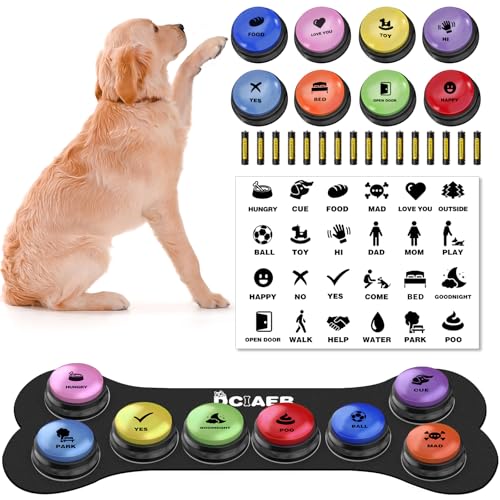
- Eight recordable buttons for custom words
- Includes mat, scene cards, stickers, and manual
- AAA battery powered with up to 30 seconds of recording
Best For: Dog owners starting structured button training at home
Caregiver Alert System
Wireless Home Pager with 2 Call Buttons
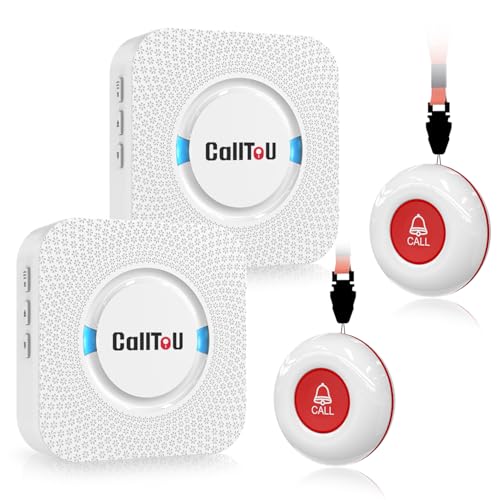
- Two buttons and two receivers for caregiver alerts
- 500+ foot stated open-area range
- 55 tones, five volume levels, and water-resistant design
Best For: Caregiver assistance and senior safety at home
Colorful Voice Button Set

- Four colored buttons for separate recorded cues
- Records and replays up to 30 seconds
- Useful for pets, games, and household interaction
Best For: Casual tabletop voice-button activities at home
Best with Extra Features
Wireless Pager and Intercom Set

- Two call buttons, receivers, and walkie-talkies
- 55 tones and five adjustable volume levels
- Waterproof, dustproof, and mountable components
Best For: Caregiver-to-resident communication at home
Best Small Voice Button Set

- Four colorful record-and-playback buttons
- Up to 30 seconds of audio recording
- Compact option for games and pet interaction
Best For: Casual home use with a few recorded prompts
Best Expanded Pet Communication Set

- Eight buttons for a growing command vocabulary
- 30-second record-and-playback function
- Color coding helps organize pet requests
Best For: Structured dog communication training at home
Portable Voice Choice – 4-Pack AAC Recording Buttons
For shoppers comparing communication buttons for home use, this four-pack offers a straightforward way to create personalized voice prompts. Each compact button records up to 30 seconds and plays messages through a built-in speaker, making it useful across home, school, and therapy settings.
Best For: Families, educators, and therapists who need portable, customizable buttons for nonverbal communication or language-support activities.
Pros:
- Each button supports recordings of up to 30 seconds.
- Clear voice output from built-in speakers.
- Four-button pack supports multiple messages or users.
- Compact and portable for use in different settings.
Cons:
- Requires two AAA batteries per button, which are not included.
- Messages must be recorded by the user rather than selected from built-in prompts.
This is a flexible option when personalized messages matter more than a preloaded communication system. Its main trade-off is the need to supply batteries and create the recordings yourself.
Interactive Learning Pick – Recordable Answer Buzzers
These recordable buzzers are a practical choice for communication buttons for home use when you also want games and learning activities. The set includes four brightly colored buttons, each with simple seven-second recording capability for messages, instructions, or feedback.
Best For: Families, classrooms, and learning centers that want accessible buttons for participation, quizzes, games, and simple recorded communication.
Pros:
- Four distinct colors make messages easy to identify.
- Large buttons are designed for accessible pressing.
- Seven-second recording supports short prompts and responses.
- Suitable for classroom games, learning centers, and family game nights.
Cons:
- Seven seconds is shorter than many dedicated AAC recording devices.
- Requires two AAA batteries.
- Indoor-focused design may be less suitable for outdoor use.
Choose this set if ease of pressing and interactive participation are priorities. It is less suited to longer, detailed messages, but its color coding and game-friendly design add everyday versatility.
Feature-Rich AAC Pick – Talking Communication Tablet
For more structured communication buttons for home use, this AAC tablet combines 37 pre-installed picture-and-color prompts with eight programmable buttons. It also includes adjustable volume, male and female voice options, and a storage bag for carrying it between home, therapy, and travel.
Best For: Nonverbal children and adults, autistic individuals, and people with speech difficulties who need common daily phrases plus customizable messages.
Pros:
- Includes 37 pre-installed prompts for common needs and feelings.
- Eight programmable buttons allow personalized recordings.
- Adjustable volume supports different environments.
- Male/female voice switch and storage bag add flexibility.
Cons:
- Requires three AAA batteries.
- More features may require a longer setup period than simple single-message buttons.
- Its tablet format is less minimal than a small standalone button.
This is the strongest fit for buyers who want ready-to-use vocabulary alongside customization. The broader feature set makes it more capable for daily communication, though it may be more device than needed for occasional single-message use.
Caregiver Alert Pick – Wireless Home Call Pager
Unlike message-recording devices, this wireless pager is designed for immediate alerts, making it a useful alternative among communication buttons for home use. Pressing the call button signals the receiver, with up to 1,500 feet of stated transmission range, multiple volume levels, and 58 ringtone choices.
Best For: Elderly people, patients, and caregivers who need a simple home assistance or nurse-call signal rather than spoken messages.
Pros:
- Long stated wireless range of up to 1,500 feet.
- Receiver offers 58 ringtones and five volume levels.
- IP55 water- and dust-proof design.
- System can expand with additional call buttons and receivers.
Cons:
- Provides an alert rather than recorded words or picture-based communication.
- Battery-powered operation requires battery maintenance.
- Actual range may vary with walls and other environmental conditions.
This is a practical choice when the goal is to summon help quickly from another room. Buyers needing expressive AAC communication should consider a recording or talking-button device instead.
Pet Communication Starter Kit – 8-Button Dog Talking Set
If you’re looking for communication buttons for home use with a dog, this 8-button set provides a ready-made starting point for recording words such as “food,” “play,” “yes,” or “no.” It includes scene cards, a button mat, stickers, and batteries to support at-home training.
Best For: Dog owners who want a larger starter kit for structured word-button training at home.
Pros:
- Includes eight recordable buttons with up to 30 seconds of recording capacity.
- Comes with 24 scene patterns, a button mat, stickers, and a training manual.
- Uses replaceable AAA batteries and is designed for repeatable playback.
Cons:
- Training still requires patience and consistent practice.
- The plastic buttons require batteries rather than rechargeable power.
With its accessories and multiple buttons, this is a practical choice for building a home communication station gradually. The included materials make it more complete than a button-only purchase.
Caregiver Alert System – Wireless Home Pager with 2 Call Buttons
For communication buttons for home use between a resident and caregiver, this wireless pager focuses on quick assistance rather than voice recording. Two call buttons pair with two receivers, helping caregivers hear an alert from bedrooms, kitchens, living areas, or other locations.
Best For: Homes supporting elderly people, patients, disabled adults, or anyone who may need fast caregiver assistance.
Pros:
- Includes two call buttons and two receivers for coverage by multiple users.
- Offers a stated open-area range of more than 500 feet.
- Provides 55 ringtone choices and five volume levels up to 110 dB.
- Call buttons and receivers are described as waterproof and dustproof.
Cons:
- Receivers require connection to an electrical outlet.
- This is an alert pager, not a system for recording spoken messages.
The pendant, bracket, and adhesive mounting options make the call buttons flexible for daily use. Its adjustable tones and high maximum volume are useful when alerts need to be heard throughout the home.
Colorful Voice Button Set – 4-Pack Recordable Buzzers
This four-pack offers a simple, compact option for communication buttons for home use, pet interaction, games, or shared household activities. Each button records up to 30 seconds, allowing you to assign short phrases, sounds, or cues to the different colors.
Best For: Families, pet owners, and adults seeking a small tabletop set for casual voice-button activities.
Pros:
- Includes four differently colored buttons in red, blue, rose, and orange.
- Records and replays up to 30 seconds of sound.
- Supports pet training, games, family interaction, and creative sound effects.
- Compact tabletop design is easy to use manually.
Cons:
- Batteries are not included.
- It does not include a mat, training cards, or other setup accessories.
This set is a straightforward pick when you want multiple recording buttons without a larger training bundle. Its color variety can also make it easier to assign different phrases or activities to individual buttons.
Best with Extra Features – Wireless Pager and Intercom Set
For households that need dependable communication buttons for home use, this CallToU set combines two call buttons, two receivers, and two walkie-talkies. It is designed to help caregivers and residents request assistance while staying connected across rooms or nearby outdoor areas.
Best For: Caregivers supporting elderly people, patients, seniors, or disabled household members who need an easy way to request help.
Pros:
- Includes two call buttons, two receivers, and two two-way radios.
- Call buttons can be worn with a neck strap, mounted with a bracket, or secured with adhesive.
- Receivers offer 55 ringtone choices and five volume levels up to 110 dB.
- Waterproof and dustproof call buttons and receivers support use in bathrooms or outdoors.
Cons:
- Receivers need to be plugged into an electrical outlet.
- Indoor range is recommended at less than 300 feet because walls and other obstacles affect the signal.
- The pager and walkie-talkie systems are separate and cannot be paired with each other.
This is the most practical option here for caregiving rather than pet training or entertainment. Its multiple alert methods, adjustable volume, and included walkie-talkies make it a flexible home communication setup, provided outlets and indoor range limitations work for your space.
Best Small Voice Button Set – Four-Color Recording Buttons
This four-pack offers a simple, playful approach to communication buttons for home use. Each button can record and replay up to 30 seconds of sound, making the set suitable for pet interaction, family games, office jokes, or basic voice-message activities.
Best For: Families, pet owners, and adults looking for colorful record-and-play buttons for casual interaction or training.
Pros:
- Records up to 30 seconds of clear audio per button.
- Includes four colors: rose, orange, blue, and red.
- Simple REC-and-playback operation is easy to learn.
- Compact design is portable for outings, games, or gatherings.
Cons:
- Batteries are not included.
- The product is not recommended for children under 12.
- Four buttons provide less room for expanding commands than the eight-button set.
Choose this set when you want a compact and entertaining introduction to recorded communication buttons. It works well for a few spoken prompts or interactive games, but buyers planning a broader pet vocabulary may prefer a larger set.
Best Expanded Pet Communication Set – Eight Voice Buttons
For pet owners who want more room to build a vocabulary, this eight-button kit is a versatile choice among communication buttons for home use. Each button supports up to 30 seconds of recorded audio, while the different colors can help organize commands such as food, water, outside, walk, and play.
Best For: Dog owners who want to teach multiple everyday requests through consistent, positive-reinforcement training.
Pros:
- Eight buttons provide space for a larger set of recorded commands.
- Each button records and replays up to 30 seconds of audio.
- Bright colors can help organize and distinguish different commands.
- REC-and-playback operation is designed for first-time users.
Cons:
- The product is not recommended for children under 12.
- Training requires consistent practice and positive reinforcement.
- The supplied details do not indicate included batteries.
This is the stronger pick for structured pet communication training because eight buttons allow commands to expand over time. Its value depends on dedicating time to consistent recording, placement, and reward-based practice.
How We Picked the Best Communication Buttons for Home Use
We grouped these products by their primary home-use purpose: augmentative and alternative communication (AAC), caregiver alerts, and recordable buttons for learning or pet training. We prioritized practical features such as recording length, ease of pressing, portability, wireless range, receiver alerts, power requirements, and the number of included buttons or accessories.
Because communication needs vary widely, there is no single best format for every household. A button that works well for a child practicing “yes” and “no” may not be suitable as an emergency call device for an older adult. The right choice should match the user’s motor skills, hearing, speech, cognitive needs, and daily routine.
Quick Comparison
- AAC communication devices: Best for expressing common requests, choices, and needs when speech is limited or unavailable.
- Caregiver pagers: Best for alerting a parent, caregiver, or family member from another room.
- Recordable buzzers: Best for simple message playback, classroom activities, speech practice, games, and pet training.
- Multi-button kits: Best for building a wider vocabulary or assigning different messages to specific routines.
Key Buying Factors for Communication Buttons for Home Use
Message and Recording Setup
Check whether the device uses prerecorded prompts, user-recorded audio, or both. Recordable buttons are flexible for phrases such as “help,” “more,” or “outside,” while AAC tablets and multi-button devices may support several frequently used choices. Confirm the recording time and whether messages can be replaced easily.
Button Size and Accessibility
Large, brightly colored buttons are generally easier to identify and press, especially for young children or users with limited dexterity. Look for a stable base, a clear activation area, and a press force the user can manage comfortably. A mat or non-slip surface can help prevent buttons from moving during use.
Alert Range and Receiver Design
For caregiver systems, compare the wireless range with the size and layout of your home. Consider whether the receiver has adjustable volume, vibration, visual indicators, multiple alert tones, or portable operation. A call button is useful only if the caregiver can reliably notice the alert.
Power, Durability, and Maintenance
Review whether the device uses AAA batteries, rechargeable power, or a wall adapter. Check battery access, expected runtime, spill resistance, and how easy the surface is to clean. Keep replacement batteries available for essential alert systems, and test the setup regularly.
Who Should Buy Which Communication Buttons for Home Use?
Choose an AAC device for a non-speaking child, autistic user, stroke survivor, or anyone who needs repeatable spoken prompts and basic choices at home. Choose a caregiver pager when the primary goal is calling someone from a bedroom, bathroom, or separate living area.
Choose recordable buzzers for speech exercises, games, classroom-style practice, or pet training. A multi-button set is the better fit when you need several messages at once, while a single button may be simpler for one reliable request. Whichever type you select, introduce only a few clear messages at first and place each button consistently so the system becomes easy to learn and use.